Step-by-Step Guide to Requesting a Reference Video from a Customer
Learn how to request a reference video from your customers, including step-by-step instructions on composing emails, adding video instructions, and sending requests.You will learn!
- How to request a reference video from your customer.
- How to customize your email and video instructions.
- Tips for ensuring high-quality customer video submissions.
Accessing the Reference Video Section
To begin, navigate to the “References” section in your dashboard.- Step 1: Open the menu in the top-left corner of your dashboard.
- Step 2: Select “References” from the dropdown list.
Sending a Reference Video Request
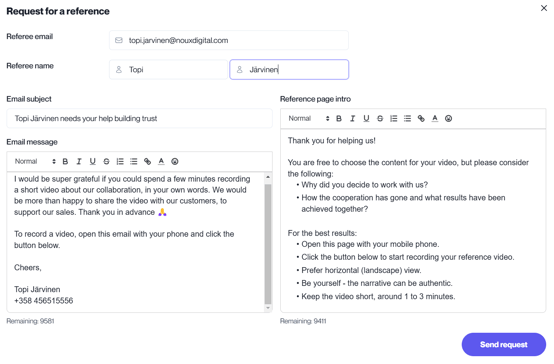
Once in the References section, you can easily send a video request to your customer by following these steps: Step 1: Fill in Recipient Details- Enter the recipient’s email address, first name, and last name in the corresponding fields at the top.
- Write the subject and message for your reference video request. You can either write a custom message or use one of the pre-made templates to save time.
- Add specific instructions to guide your customer in creating the reference video. This is optional but can improve the quality of the videos you receive.
- Why did you decide to work with us?
- How has our cooperation gone, and what results have we achieved together?
- Open this page on your mobile phone.
- Click the button below to start recording your reference video.
- Prefer a horizontal (landscape) view.
- Be yourself—the narrative can be authentic.
- Keep the video short, around 1 to 3 minutes.”