> ## Documentation Index
> Fetch the complete documentation index at: https://docs.nouxdigital.com/llms.txt
> Use this file to discover all available pages before exploring further.
# How to create a Digital Sales Room
> Step-by-step guide to setting up your Noux Digital Sales Room, whether starting from scratch or using pre-made templates.
## Step-by-step guide to setting up your Noux Digital Sales Room, whether starting from scratch or using pre-made templates.
Creating a Digital Sales Room can streamline your sales process, enabling seamless collaboration and faster decision-making. Here’s how you can set it up in just a few steps.
### You will learn!
* How to Create a Sales Room from Scratch
* How to Duplicate a Sales Room Using Templates
* Creating a Sales Room from Your CRM or ERP
### How to Create a Sales Room from Scratch
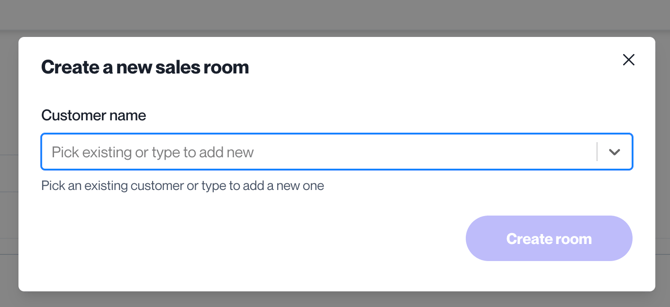
**Navigating Sales Room Setup**: To create a Sales Room, go to the sidebar and select **Sales Rooms**.
From the feature view, click on the **Add New Room** button.
\*\*Naming Your Room:\*\*Simply enter your customer’s name in the field provided to set up a new room and get started.
### How to Duplicate a Sales Room Using Templates
**Pro Tip!** You can create and name templates in addition to duplicating existing Sales Rooms, which can be reused across teams and projects for faster setup.
#### Using the Sales Room Card Options
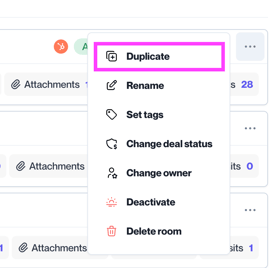
In the Sales Rooms list, use the filter to locate the room. Click the three-dots button on the right side of the card, then select **Duplicate**.
#### Using the Top Header Bar from the Sales Room
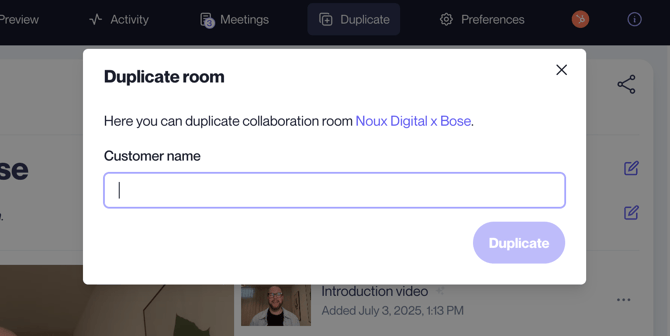
Alternatively, you can duplicate a room directly from the Sales Room card’s top header bar by selecting **Duplicate**.
After selecting **Duplicate**, you can easily search for the room you wish to duplicate.
### Creating a Sales Room from your CRM or ERP
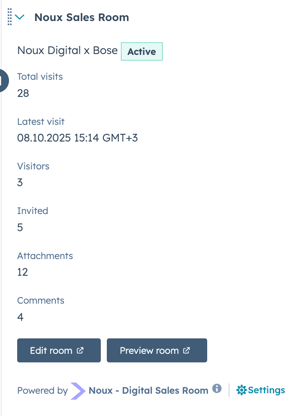
Learn how to create sales rooms directly from your CRM or ERP. Click here to explore integrations with HubSpot, Pipedrive, and Salesforce.
***Access Noux Sales Room directly from your HubSpot Deal Card***
 ### How to Duplicate a Sales Room Using Templates
**Pro Tip!** You can create and name templates in addition to duplicating existing Sales Rooms, which can be reused across teams and projects for faster setup.
#### Using the Sales Room Card Options
In the Sales Rooms list, use the filter to locate the room. Click the three-dots button on the right side of the card, then select **Duplicate**.
### How to Duplicate a Sales Room Using Templates
**Pro Tip!** You can create and name templates in addition to duplicating existing Sales Rooms, which can be reused across teams and projects for faster setup.
#### Using the Sales Room Card Options
In the Sales Rooms list, use the filter to locate the room. Click the three-dots button on the right side of the card, then select **Duplicate**.
 #### Using the Top Header Bar from the Sales Room
Alternatively, you can duplicate a room directly from the Sales Room card’s top header bar by selecting **Duplicate**.
#### Using the Top Header Bar from the Sales Room
Alternatively, you can duplicate a room directly from the Sales Room card’s top header bar by selecting **Duplicate**.
 After selecting **Duplicate**, you can easily search for the room you wish to duplicate.
 ### Creating a Sales Room from your CRM or ERP
Learn how to create sales rooms directly from your CRM or ERP. Click here to explore integrations with HubSpot, Pipedrive, and Salesforce.
***Access Noux Sales Room directly from your HubSpot Deal Card***
### Creating a Sales Room from your CRM or ERP
Learn how to create sales rooms directly from your CRM or ERP. Click here to explore integrations with HubSpot, Pipedrive, and Salesforce.
***Access Noux Sales Room directly from your HubSpot Deal Card***